New Feature: Claim Submit Button

With Webexpenses claim submit button, existing and new claimants can now submit expenses in a more efficient, clearer process.

Before the submit button launched, claimants would have to navigate through a longer submission process. Now, the submit button removes the preexisting steps involved and is easier to use for claimants.

How does the submit button work?

Once you’re ready to submit a claim, log in to your Webexpenses account and navigate to Expenses > My Claims where you’ll find a list of your existing claims.
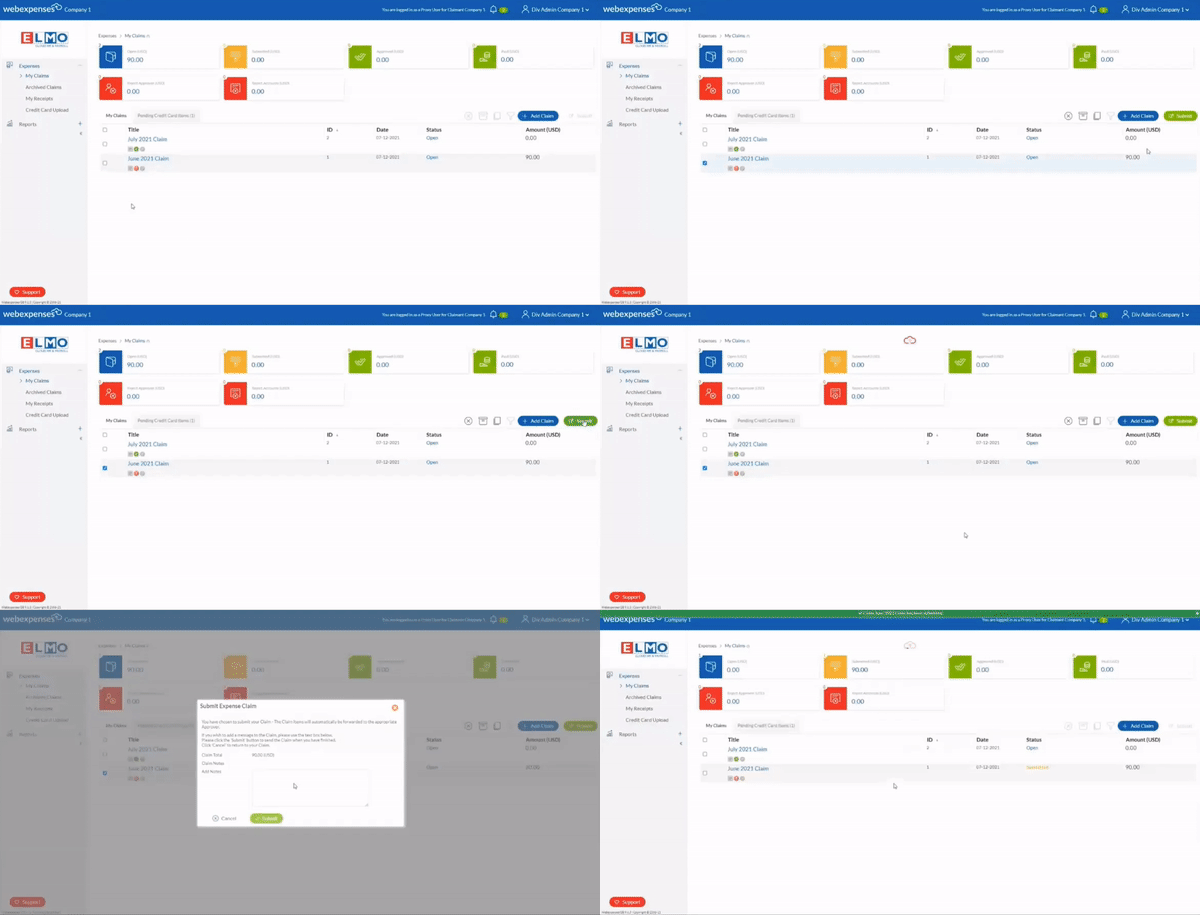
Webexpenses introduces new submit button for claimants

Then, select the tick box next to the claim you intend to submit. Once this is selected, you will see the submit button highlighted in green on the right-hand side. As you click submit, a dialogue box will appear asking you to confirm your claim. You will then receive a notification at the top of the screen to confirm that the claim has gone through successfully.

Alternatively, if you need to unsubmit your claim, the unsubmit button is also available within each claim (if it has already been submitted). To do this, click into your submitted claim and select the unsubmit button on the right-hand side.

Reminder: You can only submit/unsubmit one claim at a time and claims submitted must be either an open claim or rejected status.

Do you have any questions?

To make your user experience with Webexpenses as seamless as possible, we welcome any feedback. Reach out to your Account Manager if you have any questions or suggestions regarding the claim submit button feature.


Related articles

Close-up view of a modern car interior featuring illuminated digital instrument cluster and dashboard controls. Automotive technology concept showing speedometer, warning display, driving information, and premium vehicle cockpit design in low light conditions.

Everything You Need to Know About HMRC Mileage Rates 2026/27 

The HMRC mileage rate, or if we’re being more formal: the Approved Mileage Allowance Payment (AMAP), is the amount you can pay an employee, tax-free, for using their own vehicle on a business journey.  In other words, rather than reimbursing fuel, insurance and wear and tear separately, HMRC sets a single pence-per-mile figure that covers all of it in […]

A Finance Professional’s Guide to AI Tools: What to Use, and What to Watch Out For 

Right now, every thought leader and influencer on the internet (particularly LinkedIn) is telling finance teams to use AI. Your (correct) first thought would then be: What do they mean by ‘AI’? It’s an amorphous term, and you can’t just go off piste implementing all sorts of tools into your workflow.  Finance teams handle commercially sensitive data, personal information, and numbers […]

Our new expense reporting completely changes the UI for reporting.

Reimagined Reporting in Webexpenses: A Smarter, Simpler Navigation Experience 

It’s been a while since our reporting suite’s interface got a proper update. While the data underneath has always been robust – unlike many other expense tools, we’ve always offered real-time visibility into your corporate spend – the experience around it was overdue for a change.  The value of a report is only as good as your ability […]