There is a simple and very effective way to reduce the time and money spent on Accounts Payable – while decreasing opportunities for human error. The way to do that is by automating your invoice processing – from purchase order to payment. But before we get into how and why you should automate your invoice processing, let’s begin with the basics: Accounts Payable.
What is Accounts Payable?
There are two main terms of payment in B2B transactions: cash-based purchases and accrual-based purchases. Accounts payable pertains to the latter payment term.
Cash-based purchases are the traditional cash-for-item exchange. Accrual-based purchases are an indirect (delayed) cash exchange. Short-term loans on purchases that typically require payment within 15 to 45 days. Upon receipt of an accrual-based purchase, the payment becomes a liability to the receiver. At this point, it is considered Accounts Payable (AP) until the supplier is paid.
Simplified, accounts payable is the process of, and the team responsible for, managing and balancing the general ledger for business purchases.
The ledger is a record of credits (goods/services received) and debits (money owed). AP teams are also responsible for ensuring accurate payments are received by the correct supplier within the agreed-upon amount of time for the contracted goods/services.
The most important, and traditionally time-consuming, part of the AP process is invoice processing.
So what is invoice processing?
Invoice processing refers to the internal steps to process a supplier invoice from requisition to payment for accrual-based purchases.
It consists of steps to ensure the liability of the receivables prior to payment completion. Some companies have as many as 15 to 20 steps, so let’s distill it down:
The five main steps of invoice processing:
Step one: begins prior to purchase with a purchase order (PO). POs are internal requests for procurement costs. Typically, a requisition form is filled out, sent to an approver, then returned signed to the requester. If a request is out-of-policy, then it can require additional steps.
Step two occurs after PO approval: the order is placed and processed. Note: The PO number will then be associated with this invoice upon receipt of goods or services.
Step three occurs upon delivery of the receivables: vendor shipment and packing slip are confirmed for accuracy. Then cross-checked against the vendor invoice to make sure they match and all goods were received as contracted.
Step four consists of an additional cross-check from the internal company request to external vendor deliverable. To do this, the vendor invoice is checked against the company’s associated PO to ensure that everything lines up correctly.
Step five occurs once the prior steps have been confirmed: the invoice becomes an “accounts payable.” To close it out, AP reconciles payment and confirms it has cleared based on the terms of the contract.
Effective invoice processing is paramount to detecting and preventing invoice fraud, a common source of unnecessary loss of revenue. The process can become cumbersome if done manually, but there is a way to automate invoice processing.
How do you automate invoice processing?
Purchase-to-pay, procure-to-pay, P2P, or req-to-check. These are all names for the same system that automates your POs and invoices: invoice processing software.
This digital procurement process uses technology, like optical character recognition (OCR), for “requesting, purchasing, receiving, paying for, and accounting of goods and services”.
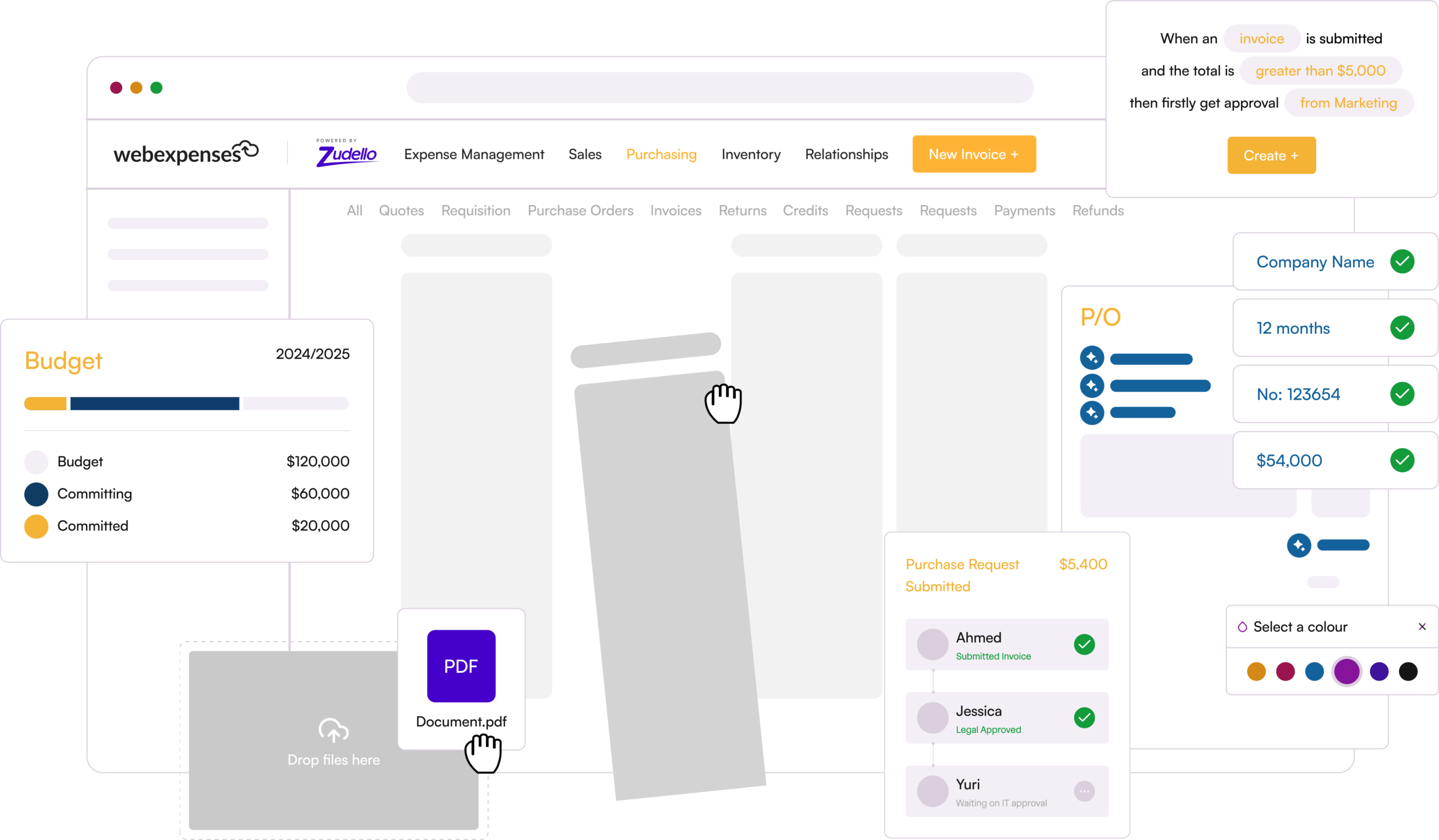
Custom fields can be set up as needed to define what your company POs and invoices require. These include various translation types such as invoices, POs, and credit notes. Any necessary data fields such as project, part number, or order system can be configured per department or purchase type. Plus, supplier workflows can be built into the system to eliminate the need for rekeying information to create workflows for repeat vendors to automate your process.
So how does a procure-to-pay solution work?
A quality procure-to-pay system will do most of the manual work for you and streamline a communication workflow between team members – in office or remotely. After configuring the system, there are four main parts to the automated invoice system:
1. Integrate your ERP with your procure-to-pay system:
The first step is to set-up the integration of your procure-to-pay system should take just a few minutes. You will need to ‘connect’ to your existing ERP, e.g. NetSuite, Xero, Sage Intacct, Quickbooks. Once completed, direct integration provides a two-way movement of data between the ERP and P2P systems.
This two-way communication eliminates the need for manual rekeying and ensures identical data between the two systems. In addition, scheduled updates ensure all data is up-to-date and:
- Invoices and credit notes are transferred automatically and immediately.
- Purchase orders match to invoices and can be downloaded for reporting.
- Payment checking provides invoice payment visibility directly from your ERP.
- Duplicate invoice checking automatically eliminates duplicate invoice processing.
- Bank detail validation verifies supplier details from the ERP – a key security feature against invoice fraud.
Next, your automated invoice processing software is ready to use. Depending on your company policies, it may begin with a purchase order, in which case:
2. Create a purchase order:
- A new PO is created, coded, and submitted by the requestor. Note: Different approvers, layouts, events, and workflows can be tailored within the P2P system.
- The PO is sent through workflows and approved for purchase internally.
- The approved PO is automatically sent to the supplier in the invoice processing system.
Then, once your order has been placed and purchase received:
3. Process the invoice:
- The supplier invoice is received, OCR scanned, and automatically matched to its corresponding PO by the procure-to-pay.
- The invoice is automatically routed to the appropriated approver for sign-off, based on the pre-set supplier workflow.
- Once approved, the invoice is automatically transferred into your ERP.
Lastly, once the system is in use, all of the information that has been collected automatically can be used by the finance department for:
4. Financial reporting:
The invoice processing software provides a number of reports and report types. These can be standard Invoice information, such as supplier spend and accruals. Generally, reports are split into two types: financial-based and activity-based.
Within our P2P system, there are four activity-based reports:
- Invoices per day
- Supplier activity
- Invoices pending approval
- Invoices approved/denied
There are also six financial-based reports:
- Supplier spend
- Accruals
- Value/volume
- Cash requirements
- Committed spend
- Open orders
What are the advantages of automated invoice processing?
There are the standard remote workflow and accountability or audit benefits of moving to a digital financial system. In addition, automating your invoice processing also provides increased efficiency, money savings, and financial forecasting. Let’s take a look at how:
Increased efficiency:
- A procure-to-purchase system reduces the time spent per invoice by about 20 minutes versus manual processing.
- Ordering time is reduced by 95% with pre-set supplier, approver, and criteria population and workflows.
- Overall, companies reduce time spent on PO and supplier invoice processing by up to 84%.
- Bonus benefit! Within the Webexpenses P2P, a potential purchase from Amazon Business will automatically generate a PO.
Error elimination & money savings:
- Automatic error checks catch potential overpayments that may be missed in a manual process. For example, if the invoice doesn’t match the PO.
- Invoices cross-checked against your integrated ERP flag duplicate invoices so you don’t pay it twice.
- Bank detail checks are more than a security feature. This anti-invoice-fraud feature saves money by confirming payment is sent to your correct supplier for a legitimate invoice.
- Financial teams can negotiate better rates using spending or and purchase data as negotiation leverage.
- Bonus benefit! It reduces money spent on paper and ink.
Better financial forecasting:
- A procure-to-pay system provides increased visibility for finance teams’ planning, reports, and controls for easy, accurate financial forecasting.
- A quick view of open orders (POs) helps finance teams determine upcoming budgetary needs. For example, once approved, a PO will then be added to a committed spend; planning for costs to incur.
- Reports of cash requirements can help finance teams anticipate payments visually in one place for better fiscal projections. For example, when an invoice matches a PO, it will remove the PO from committed spend and can then be included in financial analysis for budgeting.
Accounts payable are an integral part of business operations. A high-functioning team ensures purchases are within policy and the company ledger is accurately balanced. Traditionally, accounts payable processes like POs and invoice processing have been manual and time-consuming.
With invoice processing software, you can automate this AP process – connecting invoice processing with ERPs for a streamlined workflow. This digital workflow saves time, reduces errors, saves money, and improves budgeting and financial forecasting while eliminating the need for paper and in-person transactions to efficiently and effectively complete the procurement cycle.