New Feature Annoucement: Offset Mileage

Offset mileage is an important factor to think about when calculating and reporting on mileage claims. With the addition of offset mileage in the Webexpenses feature set, admins can now manage and report on offset mileage more accurately. Also, claimants can calculate their offset mileage whilst making a claim and view the number of units deducted.

This is a great way of ensuring claimants comply with company policy and separate company mileage costs from commuting costs. With this in mind, admins can report on offset mileage within customer, mileage rate and user reports.
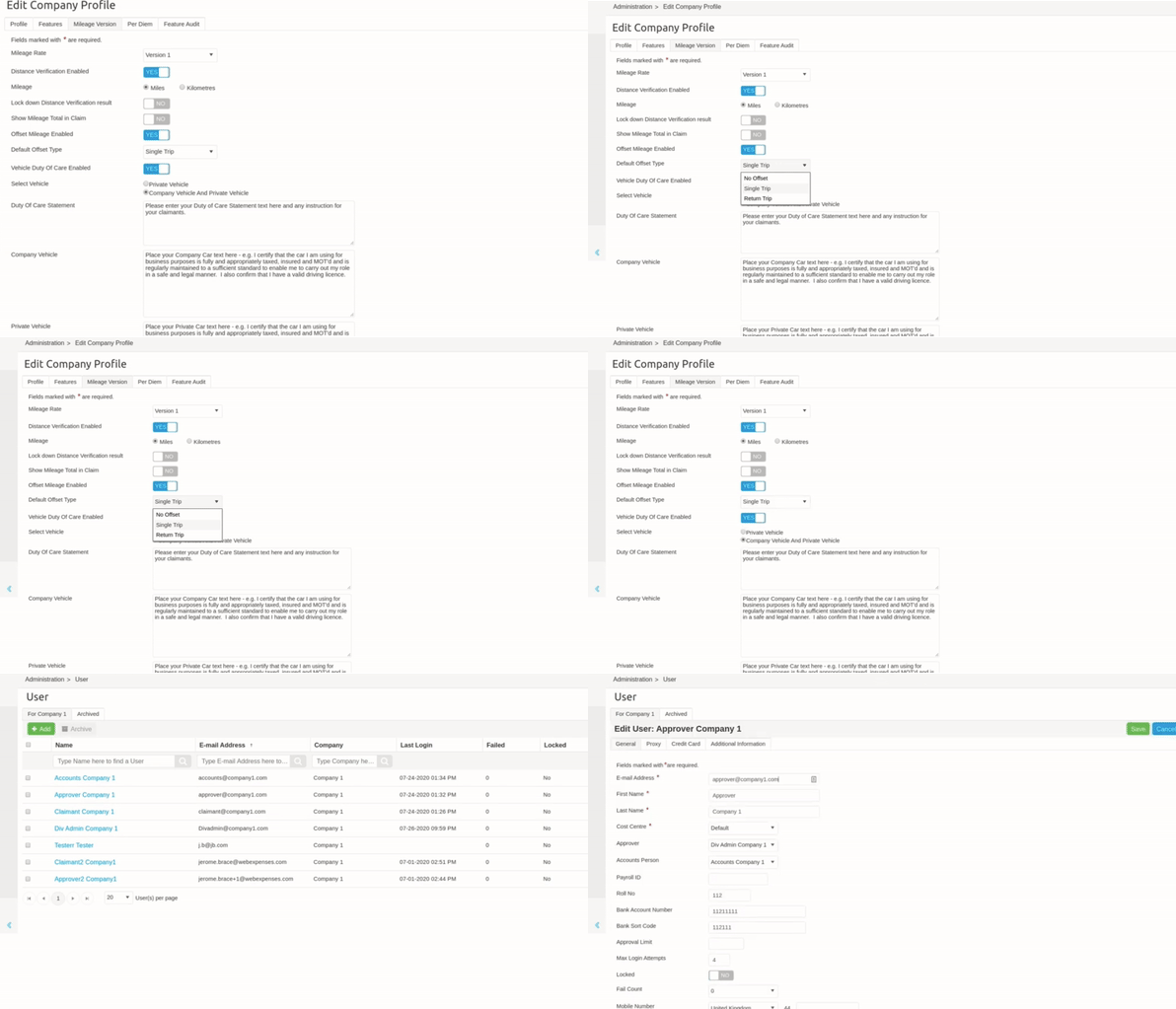
To set up offset mileage, navigate to Admin > Company Profile and select ‘offset mileage enabled’. Admins can also choose between no offset, single or return trip. Offset mileage can also be applied per user by clicking through to Admin > Users and amending as required. Once updated, user settings will not be overwritten by company settings.

Reminder: Any changes to user offset mileage will need to be changed by an admin.

Do you have any questions?

To make your user experience with Webexpenses as seamless as possible, we welcome any feedback. Reach out to your Account Manager if you have any questions or suggestions regarding offset mileage.


Related articles

G2 winter badges winning the leader, regional leader and momentum leader

G2 Winter 2025 Report: Webexpenses Secures 29 Badges Across Multiple Markets 

G2’s winter badges are in, and we’ve secured 29 of them. Awards are nice, but here’s what actually matters: these results come from verified customer reviews showing the product works for mid-size and enterprise businesses globally.  Our Winter 2025 G2 results  The winter 2025 G2 report recognised our platform across multiple categories, with particularly strong performance in the UK and European markets where we focus:  […]

Excel vs Wbx logos

Excel vs Webexpenses: When Spreadsheets Need an Upgrade 

Excel is brilliant. Let’s be clear about that from the start. It’s been the backbone of finance teams for decades, and for good reason. It’s flexible, familiar, and when you’re starting out or running a lean operation, it absolutely does the job. No one’s going to argue with that.  But here’s the thing: Excel-based expense management has limits. And if you’re reading this, there’s a good chance you’ve already bumped into a few of them.  […]

Scales weighing up between two decisions

Bolt-On Expense Management: Understanding the Trade-Offs Before You Choose

When setting up expense management for your business, the easiest option is often the one that’s already built into your existing software. Most accounting systems, ERP platforms, and HR tools come with an expense management bolt-on as standard. It’s there. It’s included. And if you’re already using Xero, Sage, NetSuite, or Hibob, it feels like […]