A broken expense process is often something you only notice in hindsight. Once you’ve moved to a more automated system, your perspective shifts and you realise: “I can’t believe I put up with that for so long.” It’s an easy mistake to make, because a broken expense process is such an insidious pest.
This is doubly true as the business grows. At 50 headcount, a spreadsheet and a shared inbox just about hold things together. Grow past that, and things begin to fall apart. Once headcount hits triple figures, the same set-up is costing you hours every week.
The danger zone is between 50 and 250. Too big to manage comfortably by hand, too small for the pain to be undeniable yet. This is where the rot sets in: nobody’s had the “we need to fix this” moment, because on any given day, things just about hold together.
The shift is gradual enough to miss. There’s no single day when it breaks, just a slow accumulation of workarounds and chased approvals. If any of the seven signs below sound familiar, it’s worth pausing to check.
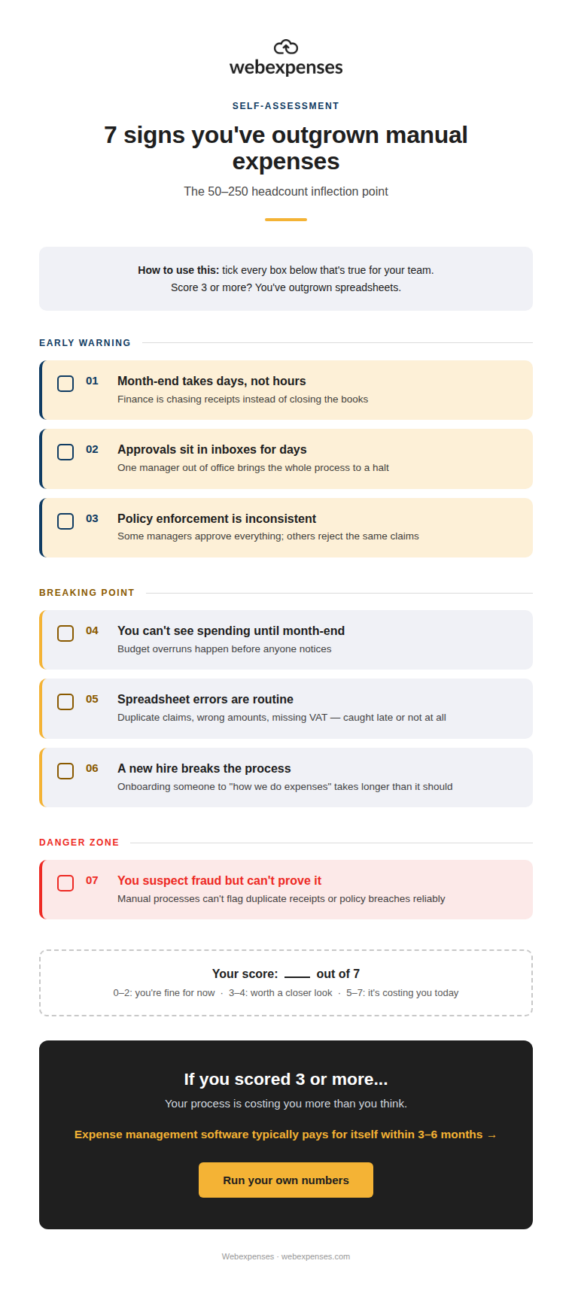
As you read, tick off the ones that are true for your team. (Download the infographic here). We’ll tally the score at the end.
The seven signs you’ve outgrown spreadsheets
1. Month-end takes days, not hours
If month-end takes days, that’s not a process. It’s damage control on a fixed schedule. Every month, the same scramble. Every month, the same excuses about why it took longer than it should have.
It’ll get harder as headcount grows. More people means more claims, more gaps, more chasing. What was a mildly annoying two-day task at 60 employees becomes a week-long ordeal at 180.
2. Approvals sit in inboxes for days
When approvals depend on a manager remembering to check their inbox, the whole process is only as reliable as that one person’s attention span. A sick day, one manager on leave, in back-to-back meetings, or simply behind on email, and claims stall.
Employees end up chasing their own managers to get reimbursed for money they’ve already spent. That’s an awkward position to put people in, and it only gets worse as you hire.
3. Policy enforcement is inconsistent
Spreadsheets and email don’t enforce anything. People do, and people are inconsistent. One manager approves everything without a second look; another rejects claims that are functionally identical, just because they happened to check the receipt.
The result isn’t just unfairness; it’s unpredictability. Employees can’t tell what will and won’t get approved, so they either play it safe and under-claim, or push their luck and see what sticks. Neither is a policy, and it only gets worse as you hire.
4. You can’t see spending until month-end
If the only time you see what’s been spent is when the numbers land in a spreadsheet at month-end, you’re not managing a budget; you’re reviewing one after the fact. Overruns have already happened by the time anyone notices.
That’s a hard way to run a department. Real-time visibility into spend means catching a problem in week two, not week four when the damage is already booked, and it only gets worse as you hire.
5. Spreadsheet errors are routine
Duplicate claims, transposed digits, missing VAT, expenses submitted against the wrong cost centre- spreadsheets don’t catch any of it. A formula can add numbers together, but it can’t tell you a receipt has already been claimed once this month.
Most of these errors get caught late, if they’re caught at all. Each one is small on its own, but they compound, and it only gets worse as you hire.
6. A new hire breaks the process
If onboarding someone new to “how we do expenses here” takes longer than it should- a walkthrough of which spreadsheet tab to use, which folder receipts live in, who to chase for sign-off- that’s a sign the process only survives because a small number of people hold it together in their heads.
That’s fragile, it doesn’t scale, and it doesn’t survive someone leaving. Plus, it only gets worse as you hire.
7. You suspect fraud but can’t prove it
Manual processes have no reliable way to flag a duplicate receipt, a claim that doesn’t match policy, or a pattern that looks off across multiple submissions. If you’ve ever had a nagging feeling about a claim but no way to actually check it, that’s not paranoia. It’s an entirely reasonable aversion to risk.
What it’s actually costing you
Processing a single expense claim manually, chasing the receipt, checking it, approving it, entering it, reconciling it, costs somewhere in the region of £15–£50 in staff time, depending on how much of that chain is genuinely manual.
At 150 employees submitting claims monthly, that adds up to a meaningful chunk of finance time every single month, before anyone’s even looked at what’s actually being claimed.
That’s before VAT leakage from missing or incorrect receipts, before duplicate claims that slip through because nobody cross-checked, and before the fraud risk that comes from a process nobody can properly audit. None of these show up as a single alarming number on a P&L.
They show up as a slow, steady drain that’s easy to underestimate because it never arrives as one bill.
What “fixed” looks like
A well-run expense process at this headcount doesn’t need to be complicated. It generally means:
- Policy checks that happen automatically as a claim is submitted, so breaches get flagged before they’re approved rather than discovered after.
- Real-time visibility into spend, so budget conversations happen with current numbers rather than last month’s.
- Approvals that don’t depend on one person’s inbox; claims can be reviewed and signed off by whoever’s actually available (not just whoever happens to be at their desk).
None of that requires finance to become a technology team. It just means the process does the checking that a spreadsheet was never built to do.
So, how did you score?
Add up the ticks.
- 0–2: You’re fine for now – but worth revisiting as headcount grows.
- 3–4: Worth a closer look. The cracks are there even if they’re not causing daily pain yet.
- 5–7: It’s costing you today, whether or not it shows up as a line item.
If you scored three or more, it’s worth running the actual numbers for your business rather than guessing. Try the ROI calculator to see what manual processing is likely costing you, or book a demo to see what a properly managed process looks like in practice.