Webexpenses users said: I’d like to manage my credit card transactions on the go.
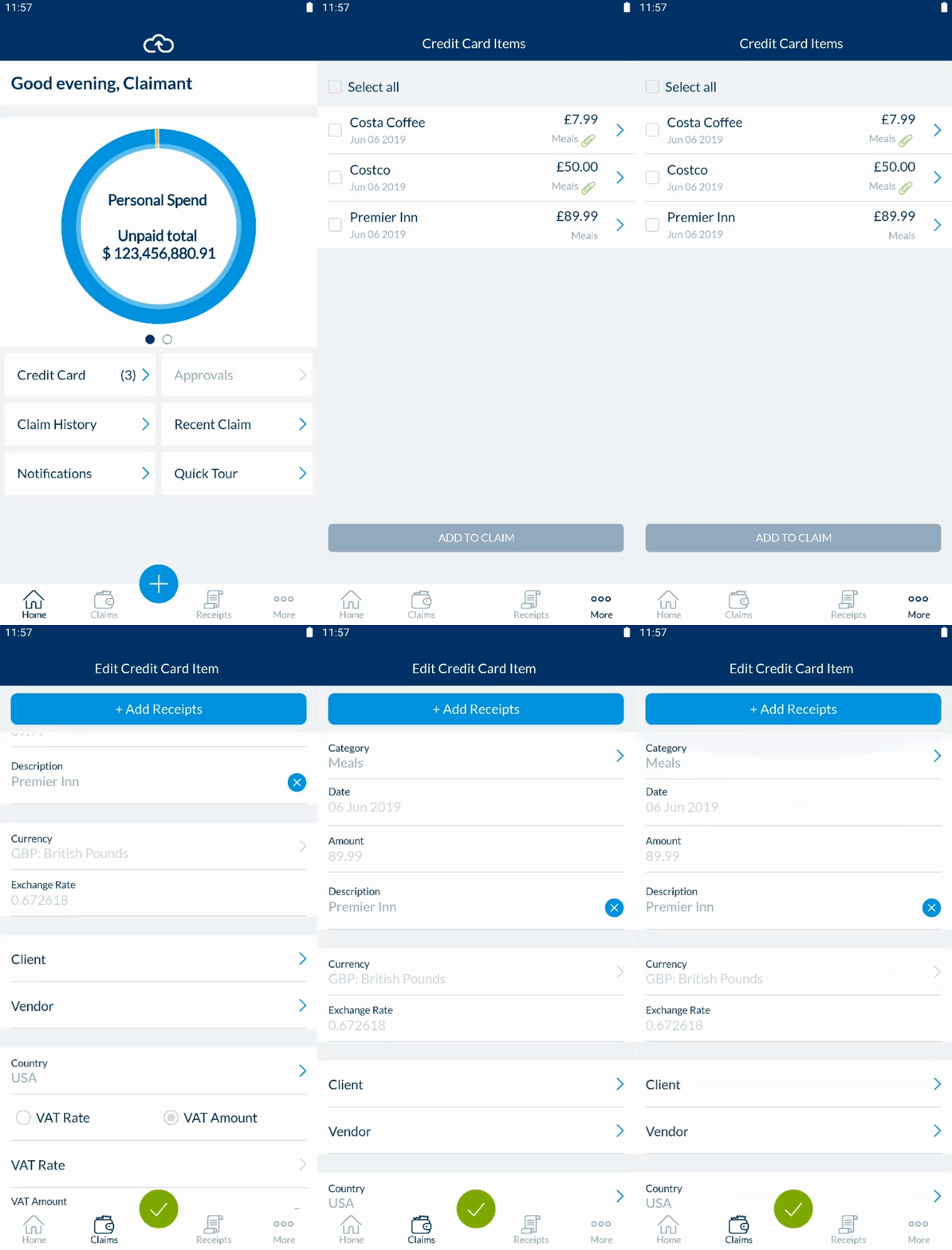
Now, this is possible, with Webexpenses’ credit card feature visible on the Webexpenses app. Previously, credit card transactions were only visible through the Web UI. However, claimants can now access, review and submit their credit card transactions through the app. This feature is quick and easy to use for claimants and approvers/admins will benefit from a more efficient process when managing employee expenses.
Where can I find it?
Once logging into the app, you will see a credit card tab on your claims page. After clicking into the credit card tab, all credit card items will be listed. Click into whichever claim is needed and you will see all receipt data pulled from the transaction.
Please note: Admins can give claimants access to delete credit card items by selecting ‘Allow delete credit card claim items’ in settings. Admins can also select ‘Restrict the claim to cash or credit card source items only’ – if set to yes, this will filter out any claim headers with cash items.
Do you have any questions?
To make your user experience with Webexpenses as seamless as possible, we welcome any feedback. Reach out to your Account Manager if you have any questions or suggestions regarding the credit card on mobile feature.