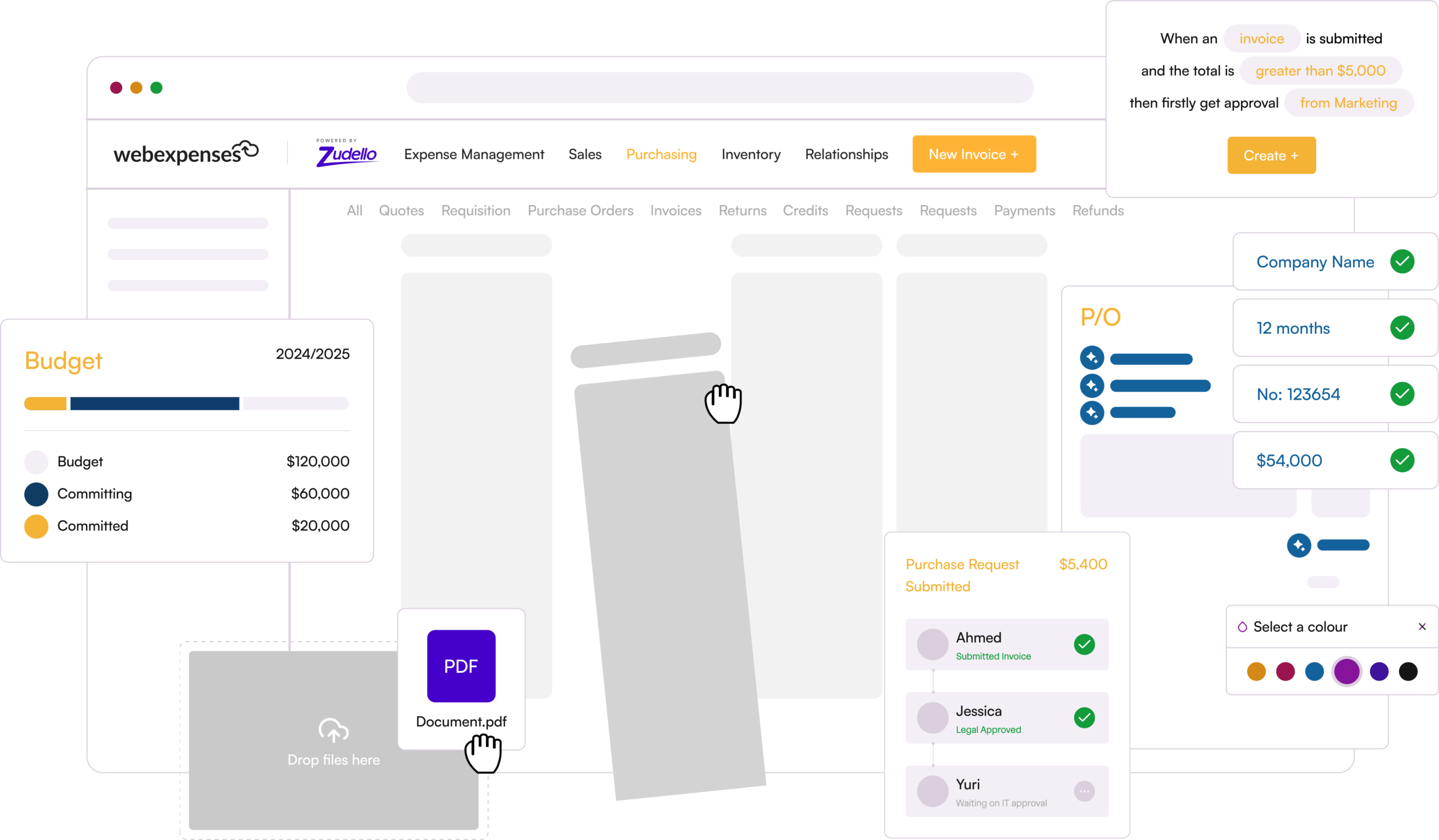
A FinOps platform, in its simplest form, is software that keeps your daily finance work in one place, with one shared record for each transaction. Purchase requests, approvals, purchase orders, contracts, invoices, budgets, customer orders and expenses are all linked together. And your ERP stays the system of record.
The point of it is simple. In most finance teams, a single purchase is recorded in five or more places: an email, a PO in the ERP, a contract on a shared drive, an invoice in the AP inbox and a budget in someone’s spreadsheet.
Your team becomes the link between them, matching and chasing by hand. A FinOps platform joins those steps up as they happen, so what one step records, the next one can see.
If a single invoice takes you 10 minutes to process by hand, 1,500 invoices a month adds up to more than 250 hours of keying, matching and chasing. That’s the work a FinOps platform is built to eliminate.
One note on the term ‘FinOps’: In IT, it also refers to cloud financial management, which means tracking and controlling what you spend on cloud services such as AWS or Azure. That’s a different discipline.
Here, FinOps means finance operations: the work your finance team does every day to buy, approve, pay and report.
What a FinOps platform does
A FinOps platform covers the spend cycle from the first request to the final payment, plus the customer orders coming the other way. Its defining feature is one record per transaction: every step adds to the same record instead of starting a new one somewhere else.
The easiest way to see the difference is to follow one purchase.
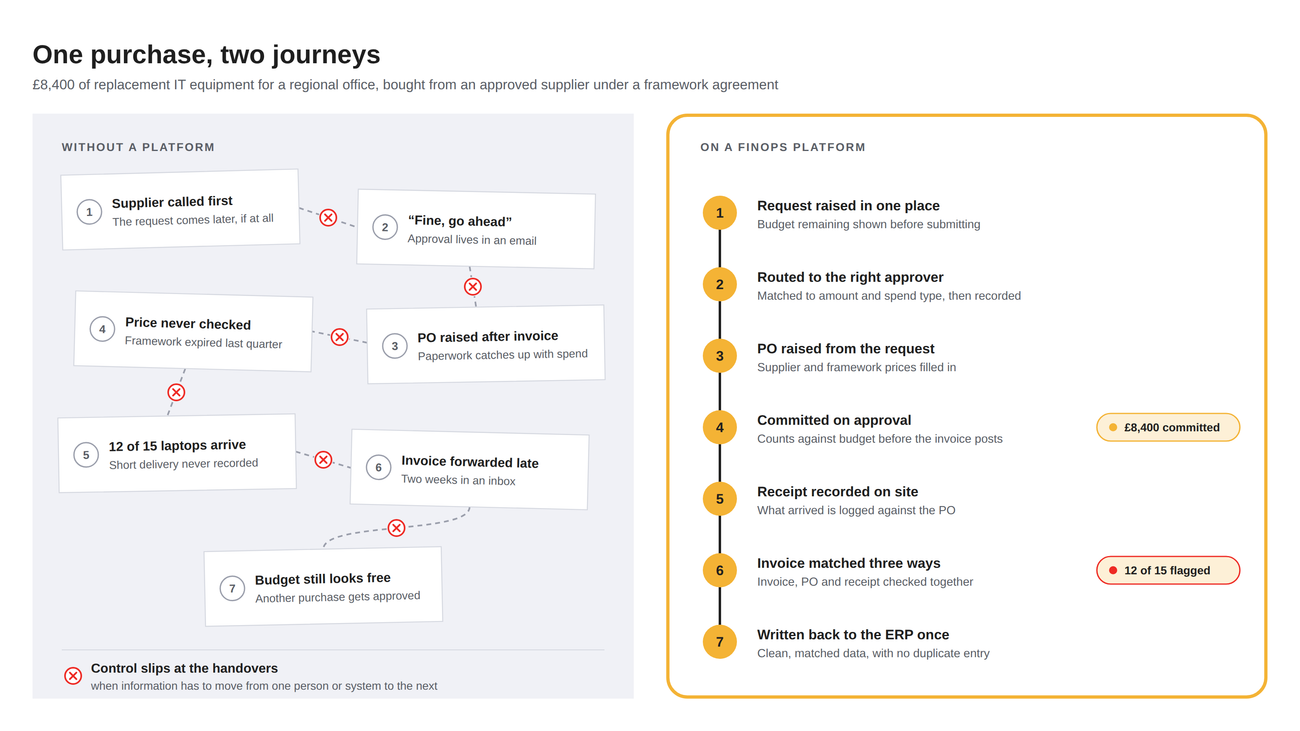
Say a facilities manager needs £8,400 of replacement IT equipment for a regional office. You have a framework agreement with an approved supplier at fixed prices, and the spend comes out of the facilities budget for the quarter.
Without a platform, it often goes like this. The supplier is called first and the request comes later, if at all. Approval arrives as “fine, go ahead” in an email. The PO is raised after the invoice turns up. Nobody checks the price against the framework agreement, which expired last quarter.
The laptops arrive, but nobody records that only 12 of the 15 turned up. The invoice goes to the facilities manager, who forwards it two weeks later. The budget report shows the money as available until the invoice posts, so another purchase gets approved in the meantime.
None of those steps is unusual, and none of them is a failure of one person. Control slips at the handovers, when information has to move from one person or system to the next.
How it would work differently with an AI FinOps platform
- The manager raises the request in one place and sees what’s left in the budget before submitting it.
- The request goes to the right approver for that amount and spend type, and the approval is recorded against it.
- The PO is raised from the approved request, with the supplier and framework prices already filled in.
- The £8,400 counts against the facilities budget as soon as the PO is approved, not when the invoice posts.
- When the equipment arrives, the site records what was received against the PO.
- The invoice is captured as it arrives and matched against the PO and the receipt. The short delivery is flagged before anyone pays for 15 laptops.
- Clean, matched data is written back to your ERP once.
Six months later, when your auditor picks this purchase, the request, approval, PO, contract terms, receipt, invoice and payment are all in one record. Nobody spends a morning rebuilding the trail from emails.
How a FinOps platform differs from your ERP
A FinOps platform doesn’t replace your ERP. Your ERP is good at being the ledger: it holds the record, runs the reports and keeps your auditors happy. What most ERPs weren’t built to do is read documents, chase approvers or check a purchase against a budget before anyone commits.
That first mile is where a FinOps platform works. Documents are read, coded and matched as they arrive, approvals are routed and recorded, and clean data is written back.
Your ERP still holds the general ledger, the chart of accounts and the master data for suppliers, customers and GL codes. The platform syncs that data, usually hourly or daily, so it’s always checking against the same codes your ERP uses.
How it differs from a point tool
A point tool does one job: read invoices, say, or manage contracts. That’s useful, but it leaves you with the work between the tools.
An invoice reader still leaves you to check the price against a contract held somewhere else, chase the approval by email and find out at month-end whether the budget could take it.
A FinOps platform puts those jobs on the same record. The invoice is checked against the PO, the goods receipt and the contract price in one place, and the budget already knows about the commitment. You stop being the link between systems.
What changes when you run on one record
The cost of running on separate systems rarely shows up as a line in the budget. It shows up as time, gaps in control and money that leaks out quietly.
A FinOps platform changes four things.
1. You can find things
Every invoice, order, contract and approval sits in one searchable place, linked to each other. When a supplier calls about an unpaid invoice, the order, the receipt and the approval are already joined up, so you can answer while they’re still on the phone.
2. You stop chasing
Approvals follow the routes you set, by value, department, entity or document type, and the platform sends the reminders. When someone is out of the office, their approvals pass to a nominated delegate. Invoices that match go through, and the ones that don’t go to the person who can fix them, with the difference already highlighted.
3. Your controls hold
Most finance policies rely on people remembering them at the moment they spend. On a FinOps platform, controls apply at the point of commitment, before the money goes. That matters in three places:
- Budgets. If your budget report only shows invoiced spend, it’s out of date. Take a £100,000 marketing budget with £62,000 invoiced. The ledger says £38,000 is left. But £21,000 is already committed in open POs and signed work, so the real figure is £17,000. A platform that counts committed spend as soon as a PO is approved gives your budget holders the real number.
- Contracts. The average business loses a significant chunk of its annual revenue to poor contract management. Much of it comes after signature. A £24,000-a-year software contract that renews for three years unless you give 90 days’ notice, and rolls over with a 7% uplift, commits you to £77,040. With contracts on the same record as invoices, renewals are flagged before the notice deadline and every invoice is checked against the agreed price.
- Fraud. Fraudsters often exploit the cracks between your disparate software systems. For example, a criminal persuades someone to pay a real invoice into the wrong account. A bank detail change requested by email, approved by email and paid from a separate system is exactly the gap they look for. On one record, bank detail changes are validated before they take effect.
4. You can show your working
Committed spend is visible the moment it’s approved, and every approval is recorded against the transaction, with who approved it and when. Month-end confirms what you already knew, and audit packs come from the system instead of being rebuilt by hand.
You can also ask questions of your data in plain English and turn the answer into a dashboard or report, so you can look into your spend, approvals and exceptions long before an auditor does.
Signs you need a FinOps platform
You probably don’t need one if your volumes are low and one person can hold the whole process in their head. You likely do if several of these sound familiar.
Finding the PO, the invoice and the approval behind one number means opening three systems. Approvals sit in email chains, with no record of who decided what. You can’t see committed spend until the invoice arrives.
POs are often raised after the invoice. Each entity has its own coding, VAT treatment and approvers. Month-end runs long because the supporting information is scattered, and audit records are put together after the fact.
If three or more of those apply, the problem isn’t your people or your policies. It’s the gaps between your systems.
How the Webexpenses FinOps platform works
The Webexpenses FinOps platform, powered by Zudello, is built around six modules that sit around your ERP. You can start with one and add the rest as you go.
In the back office, Webexpenses Purchase Orders gives purchase requests one place to live. Requests are approved against budget and policy, using catalogues with your preferred suppliers and agreed prices, then issued to suppliers as accurate POs.
Webexpenses Accounts Payable reads invoices as they arrive, from PDFs, spreadsheets, Word documents and images, down to line level. It matches them two-way or three-way against what was ordered and received, within tolerances you set, and sends anything that doesn’t match to the person who can fix it, showing which line is out and by how much.
Webexpenses Budgets measures every commitment against the right budget before it’s approved, so your budget holders see their live position, not last month’s.
In the front office, Webexpenses Contract Management keeps every agreement in one place, flags renewals before the notice deadline and checks invoices against the rates you agreed.
Webexpenses Order Management captures customer orders as they arrive, checks pricing and product codes against your ERP and creates the sales order.
Webexpenses Expense Management handles claims, mileage and card reconciliation, with policy applied as each claim is submitted. It’s available today as a standalone product as well.
Every finance team works differently, so we start with a conversation, not a demo. Book a discovery call and we’ll talk through how spend moves through your business today, where it slows down, and then tailor a demo to what matters to you.
Want the full picture? Our guide Two-way, three-way, no-way covers matching types, tolerances, exception handling and the numbers worth tracking. Download the guide.